Integrations and connections
Integrations provide access to other services. A connection is the specific setup for an account and an authorized scope.
View available services
- Open your user menu at the bottom left.
- Select Integrations. In Chat, Connect apps may also take you there.
- Search for a service or use the category filter.
- Read the status on the relevant card.
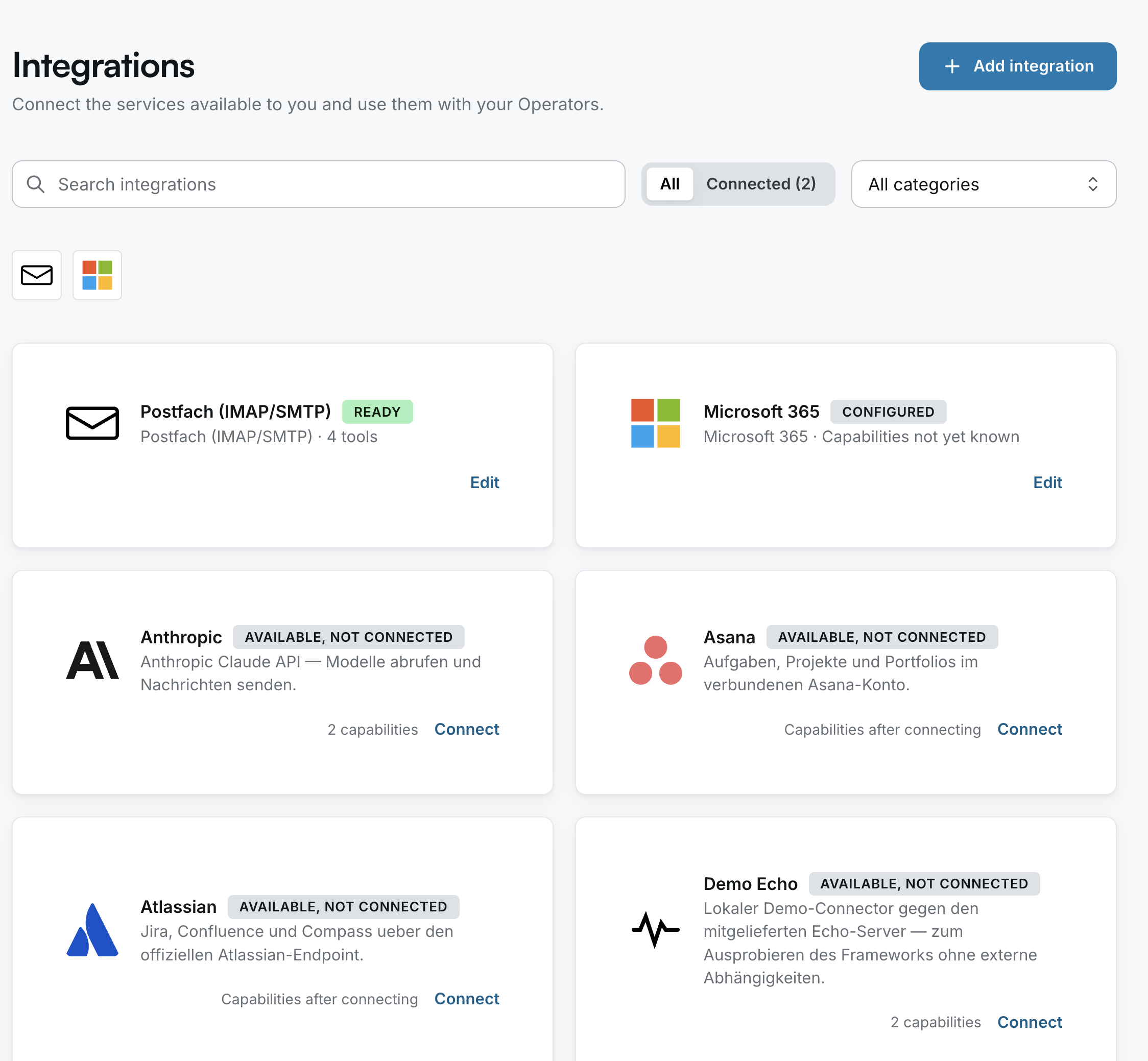
Understand connection states
| Displayed status | What to check |
|---|---|
| AVAILABLE, NOT CONNECTED | The integration is offered; a connection still needs to be set up. |
| CONFIGURED | A configuration exists. Check for any further steps or tests displayed. |
| READY | The interface reports the connection as ready. Still check the capabilities needed for your specific task. |
| Capabilities not yet known | The available capabilities aren't known here yet. |
Set up a connection
Open the card for the service you need. Use Connect, if available to you, and follow the service-specific steps. Some services require signing in with the provider; others require approved credentials or administrator setup.
Before granting consent, check the account, the requested access and your organization's rules. Ask your administrator if you're missing information.
Use a connection with an Operator
Describe the task and name the service required. An existing connection doesn't mean every Operator can use every feature. Access, Operator configuration and any required approvals work together.
Navigation may change for administrators
Opening Integrations may display the administration navigation. Use Back to workspace to return to your workspace.